12. Pros and trade-offs
Beyond the core features on the previous page, these are the advantages WordPress users notice most:
- Fewer moving parts. Features maintained by one project means fewer plugin conflicts and fewer separate updates to juggle.
- Structure that scales. Nested categories, menu-driven pages and per-page modules stay manageable on sites with hundreds of sections.
- Customisation that survives updates. Overrides and child templates keep your changes out of core files, and Joomla flags overrides whose originals changed.
- Community owned. Joomla is developed by volunteers under Open Source Matters, a non-profit. No single company controls it.
And what you give up:
- Smaller ecosystem. Far fewer extensions and templates. For a niche need you may find two options instead of twenty.
- Steeper first week. Menu items, module assignment and ACL take some getting used to. Plan training time for clients.
- No comments in core. You need an extension or an external service.
- No block editor in core. The default editor is TinyMCE. For Gutenberg-style building, use a page builder extension.
- Smaller talent pool. WordPress freelancers are easier to find. Factor that into long-term maintenance.
13. Migrating from WordPress
What moves cleanly, and what does not
WordPress exports its content as a WXR file (Tools → Export), and migration extensions on the JED can import it or read the WordPress database directly. Either way, expect three kinds of content:
- Moves cleanly: post and page text, categories, tags, authors, and media files (copy
wp-content/uploadsand check that image paths point to the new location). - Needs cleanup: shortcodes stay as plain
[shortcode]text; Gutenberg leaves<!-- wp:paragraph -->comments in the HTML; ACF values must be mapped to Joomla custom fields; SEO plugin titles and descriptions must be mapped to article meta fields; comments need a comments extension; and user passwords usually need a reset unless your migration tool handles WordPress password hashes. - Usually rebuilt: page-builder layouts (Elementor, Divi and others store them in their own format), the theme design, forms and shops.
Six steps
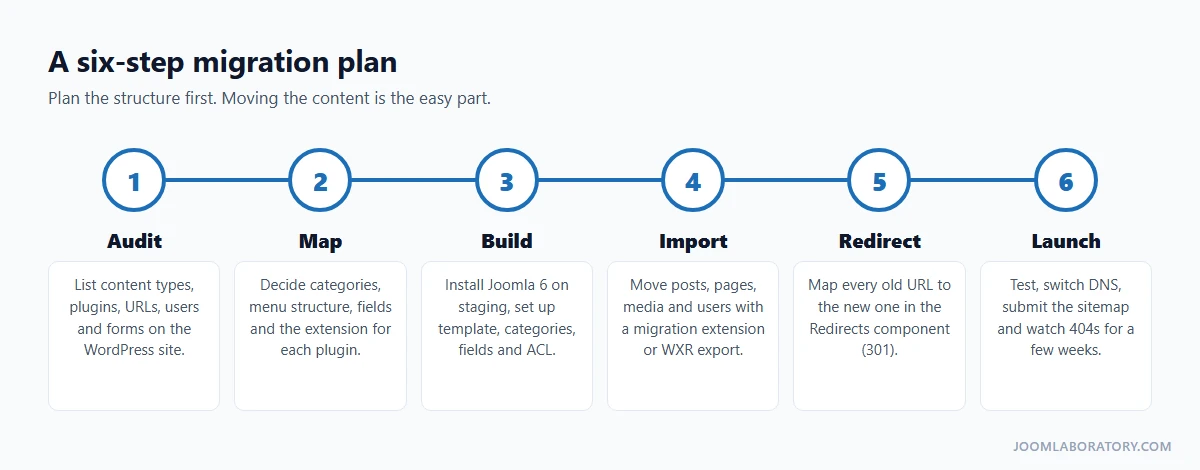
- Audit. List content types, active plugins, forms, user roles and every URL that gets traffic. Export the URL list from your sitemap or an SEO crawler.
- Map. Decide the category tree, the menu structure, the custom fields, and the Joomla core feature or extension that replaces each plugin.
- Build. Install Joomla 6 on a staging site and set up the template, categories, fields, user groups and access levels before importing anything.
- Import. Move the content, then clean up shortcodes, block comments and image paths.
- Redirect. Map every old URL to its new one, for example
/2026/11/my-post/→/blog/my-post. Add the 301 redirects in Components → Redirects and enable the System - Redirect plugin with Collect URLs on, so missed URLs show up as 404s. - Launch. Test forms, permissions and languages, switch the domain, submit the new sitemap, and check the Redirects list for new 404s every few days for the first weeks.
Do not skip step 5. Lost rankings after a CMS switch almost always come from missing redirects, not from the CMS itself.
14. FAQ
Is Joomla free?
Yes. Like WordPress, Joomla is free and open source under the GNU GPL. Extensions and templates can be free or commercial.
Can Joomla run an online shop?
Yes, with an e-commerce extension, the way WooCommerce works for WordPress. Popular options include J2Commerce, HikaShop, VirtueMart and Phoca Cart.
Is there a page builder like Elementor?
Not in core, but several exist as extensions, for example YOOtheme Pro, SP Page Builder and Gridbox. Many sites do well with Cassiopeia, modules and a few overrides instead.
How do I back up a Joomla site?
Joomla has no backup tool in core. Akeeba Backup is the widely used extension for full-site backups and restores. Your host's backups are a useful second layer.
What about caching?
Joomla has built-in caching: Conservative or Progressive caching in Global Configuration → System, and the System - Page Cache plugin for full-page caching. Server-level caching, such as LiteSpeed, works on top.
Is Joomla good for SEO?
Yes: search-engine-friendly URLs, meta data per article and per menu item, Schema.org structured data and a redirect manager are in core. For XML sitemaps you add an extension.
Do I need to know PHP?
No. You can build and run a Joomla site entirely from the administrator. PHP helps for overrides and your own extensions.
Where do I start?
Install Joomla 6 locally or on a test subdomain, click Take a Tour, then do the five-minute About page exercise from page 2. If you are completely new, start with I want to build a website with Joomla CMS. Where should I start?
Conclusion
Moving from WordPress to Joomla is mostly a change of vocabulary plus one new idea: menu items decide how and where content appears. Once that clicks, you get a CMS that handles multilingual content, fine-grained permissions, custom fields, workflows and secure logins without a stack of plugins. The ecosystem is smaller and the first week is steeper, but for structured, multilingual or permission-heavy sites, Joomla lets you build more with less.