If you build sites with WordPress, you already know most of what Joomla does. Posts, pages, widgets, themes and plugins all have Joomla equivalents. What changes is how they connect: in Joomla, menu items decide where and how content appears, and many features you add with plugins in WordPress are already in core.
This guide is for WordPress users, site builders and agencies. After reading it you will know where everything lives in the Joomla 6 administrator, how to build a page the Joomla way, what you gain and what you give up, and how to plan a migration. It describes both platforms as of November 2026, so some details may change with future releases.
1. The mindset shift: content, categories and menu items
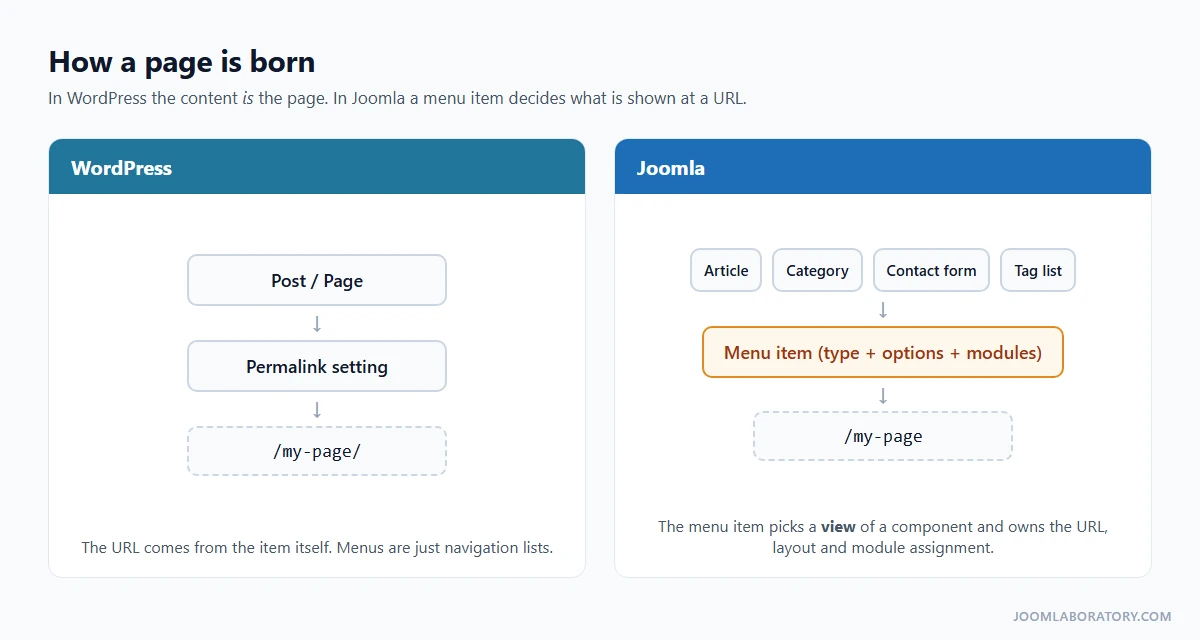
In WordPress, the type of content decides the type of page. A post goes into the blog, a page stands on its own with its own permalink, and a menu is only a list of links.
Joomla separates what you publish from how and where it appears:
- Articles are the content. There is one content type for everything, from a blog post to an "About us" page.
- Categories organise articles. Every article belongs to exactly one category.
- Menu items turn content into pages. A menu item points to a view (a single article, a category blog, a contact form, a search page) and owns that page's URL, layout options, page title, meta data, module assignment and template style.
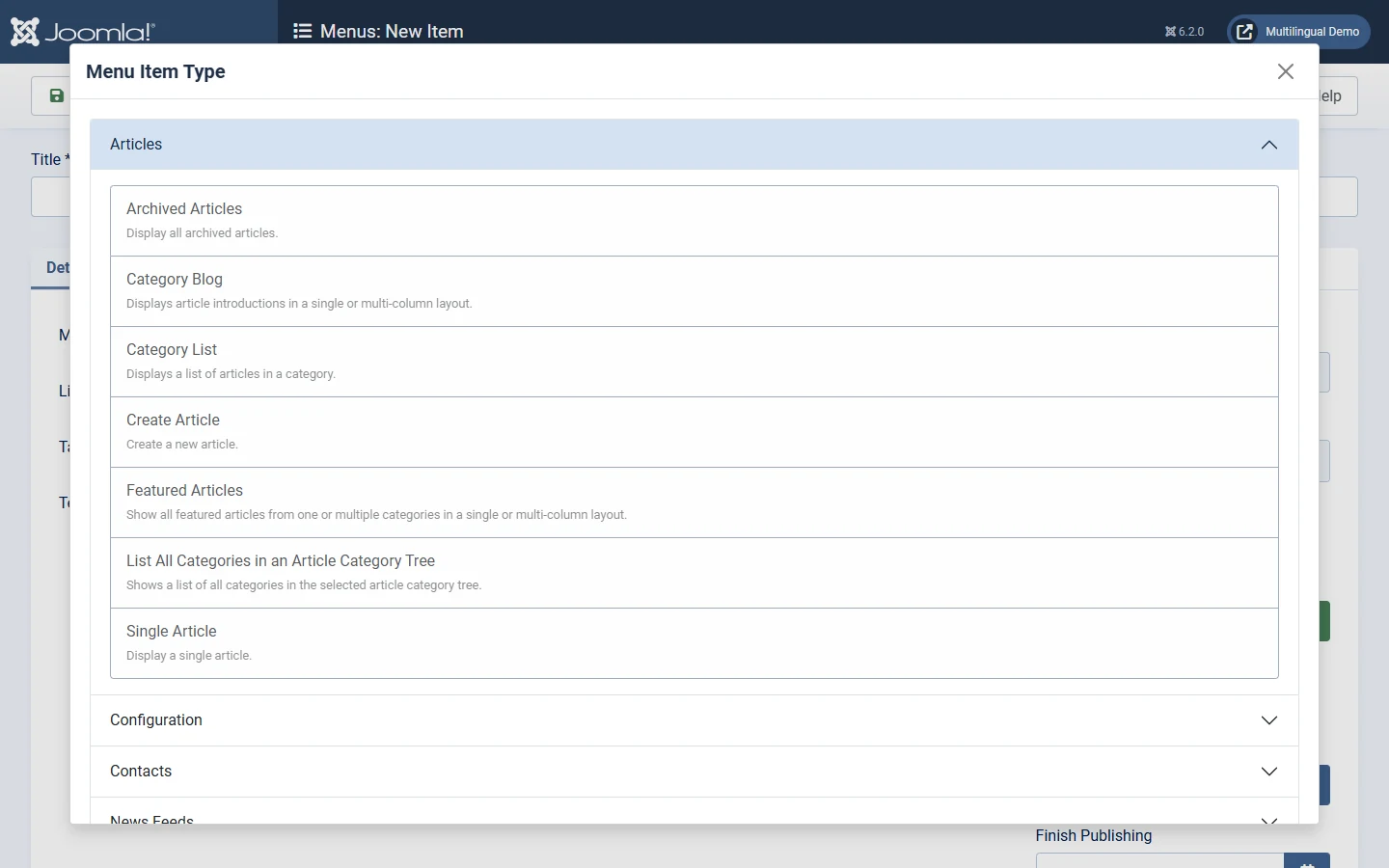
When you create a menu item, the first thing you choose is its Menu Item Type. This list is the real "page builder" of Joomla: every component offers its own views, and third-party extensions add more.
An article does not need its own menu item. Joomla shows it through the nearest menu item for its category and uses that item's URL path, settings and modules. That is how /tutorials/your-article works on this site: there is one menu item for the Tutorials category, not one for every tutorial.
If you remember one thing from this guide: menu items control how and where content appears. Most "where is the setting for...?" questions are answered by the menu item, or by the component's Options button.
Tip: need a page that is not in the navigation, such as a landing page or a "Thank you" page? Create a separate menu (for example "Hidden Menu") and do not publish a menu module for it. Its items still get clean URLs.
2. The vocabulary map
Most WordPress concepts exist in Joomla under a different name. Some are split into more specific parts.
| WordPress | Joomla | What is different |
|---|---|---|
| Posts and pages | Articles | One content type. A menu item makes an article a page. |
| Permalinks | Menu items + SEF URLs | The URL comes from the menu item alias and the category path. |
| Categories (hierarchical) | Categories (nested) | One category per article. Each category has its own permissions, access level and language. |
| Tags | Tags | Can be nested and used on articles, categories, contacts and more. |
| Themes and child themes | Templates, template styles and child templates | Separate site and administrator templates. One template can have several styles. |
| Widgets and widget areas | Modules and module positions | Each module chooses the pages it appears on, its access level and its language. |
| Plugins | Extensions | Split into components, modules and plugins (see page 3). |
| Shortcodes | Content plugins | For example |
| Hooks (actions and filters) | Plugin events | For example onContentPrepare, onContentBeforeSave, onAfterRender. |
| Custom fields / ACF | Custom fields | In core for articles, categories, contacts and users. |
| Roles (5 default) | User groups + access levels | Configured in the administrator, no code needed. |
| WP-Cron | Scheduled Tasks | With an interface, run by the lazy scheduler, web cron or the CLI. |
Three mappings deserve a note:
- Shortcodes → content plugins. A content plugin replaces a tag in the article text when the page is rendered. The core Load Modules plugin gives you
{loadmodule},{loadposition}and - Hooks → plugin events. Instead of
add_action()infunctions.php, you write a small system or content plugin that subscribes to events. It installs, updates and switches off like any other extension. - Custom post types. There is no one-to-one equivalent. For most sites, a dedicated category plus custom fields does the job. For data-driven applications, use a component built for that purpose.
- Hits: 26