8. What you get in core
A typical WordPress site adds plugins for multilingual content, roles, custom fields, redirects, two-factor login and search. In Joomla these ship with the CMS and are maintained by the same project:
| Feature | Joomla 6 core | Typical WordPress |
|---|---|---|
| Multilingual sites | Content languages, associations, language switcher, hreflang | Plugin (WPML, Polylang…) |
| Access control | Unlimited groups, access levels, per-item permissions | 5 default roles; more needs code or a plugin |
| Custom fields | 15+ field types, field groups, subforms | Basic custom fields; ACF or similar for more |
| Content workflows | Stages and transitions (opt-in) | Plugin |
| Multi-factor login and passkeys | TOTP, WebAuthn/passkeys, YubiKey, codes by email | Plugin |
| Site search | Smart Search index with stemming and filters | Basic search; plugin for more |
| Redirect manager | Redirects component that logs 404s | Plugin (core only redirects changed post slugs) |
| Scheduled tasks | Task Scheduler with interface and CLI | WP-Cron, no interface |
| Output overrides | Override any view, module or layout from the admin | Template files in a child theme |
| Structured data | Schema.org per article | SEO plugin |
| Contacts, banners, news feeds | Core components | Plugins |
| REST API | Web Services API with tokens | Core REST API |
| Automatic updates | Core patch and security updates, verified with TUF | Core minor and security updates |
To be fair, the last two rows are a draw: WordPress also has a REST API and automatic security updates in core. Our related guides: cron jobs and Scheduled Tasks and automatic updates in Joomla 6.
9. Users, groups and access levels
WordPress has five default roles (Administrator, Editor, Author, Contributor, Subscriber). Joomla's Access Control List separates two questions, and both are configured in the administrator:
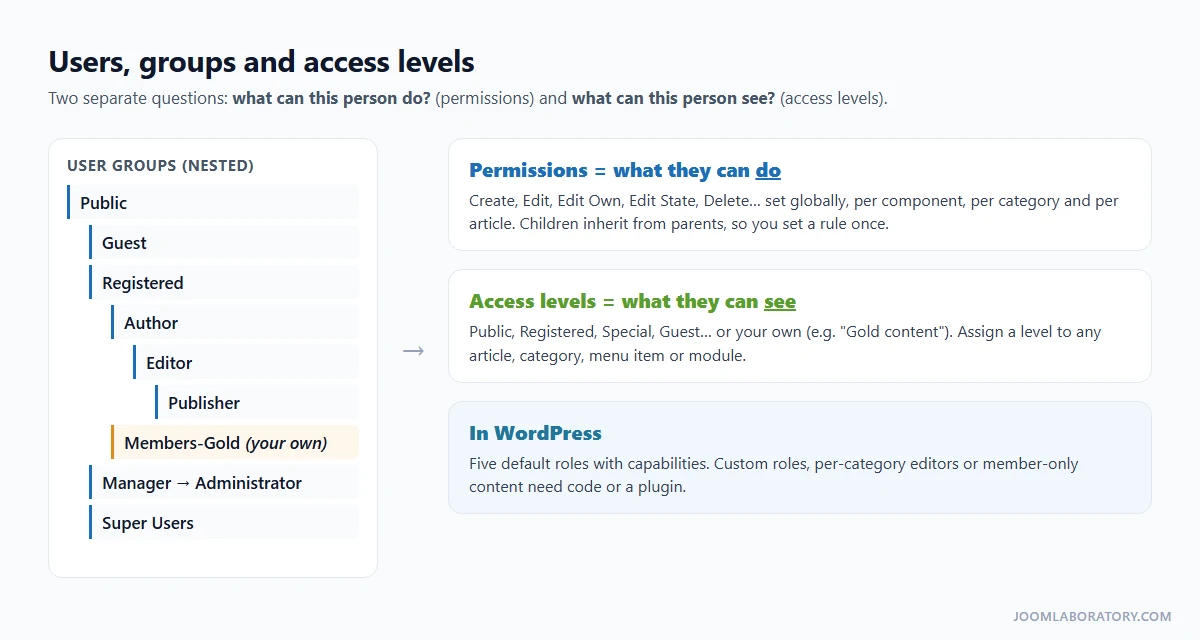
- User groups (Users → Groups) are nested, and child groups inherit their parent's permissions.
- Permissions answer "what can this person do?": create, edit, edit own, edit state, delete. Set them globally, then refine per component, per category and even per article.
- Viewing access levels (Users → Access Levels) answer "what can this person see?". Assign a level to any article, category, menu item or module.
A members-only area therefore needs no membership plugin: create a group, an access level for it, and set that level on the category, its menu item and its modules. For a real example, see how to let users edit only their own articles in specific categories.
10. Multilingual sites without a plugin
Where WordPress needs WPML or Polylang, Joomla runs multilingual sites in core: install the language packs, publish the content languages, enable the Language Filter plugin, give each language its own menu and Home page, link translations, and add a Language Switcher.
The details matter, so we wrote a separate guide with real Joomla 6.2 screenshots: How to Create a Multilingual Joomla Website: Step-by-Step Guide (Joomla 6).
11. Finding your way around the administrator
The Joomla back end lives at /administrator instead of /wp-admin:
| In WordPress | In Joomla 6 |
|---|---|
| Posts / Pages | Content → Articles |
| Posts → Categories | Content → Categories |
| Media | Content → Media |
| Appearance → Menus | Menus → Manage (and each menu by name) |
| Appearance → Widgets | Content → Site Modules |
| Appearance → Themes | System → Site Templates / Site Template Styles |
| Plugins → Add New | System → Install → Extensions |
| Plugins → Installed | System → Manage → Extensions (or Plugins) |
| Dashboard → Updates | System → Update → Joomla / Extensions |
| Users | Users → Manage |
| Settings → General | System → Global Configuration → Site |
| Settings → Reading (front page) | The menu item set as Default Page |
| Settings → Permalinks | Global Configuration → SEO Settings, plus menu item aliases |
| Comments | No core equivalent (see page 5) |
Tip: click Take a Tour in the administrator header for Joomla's built-in Guided Tours, such as "How to create articles" or "How to add menus". It is the fastest way to learn the screens.
Every component also has an Options button in its toolbar. That is where its global defaults live, for example how articles display by default.