
Module
Facebox
Show a profile card for any site user, with a photo, your own text and links to their Facebook, X, LinkedIn, Pinterest and GitHub profiles.
- J6
- Updated
Latest release
Stablev2.0.0
Download Facebox- File
- mod_facebox-1793440004.zip
- Size
- 19.7 kB
- Released
- SHA-256
- be5fd62e7c2ac599595669528d9ed917561f91ed0143c823723cbafb6eb9d79d
Once installed, new versions appear under System → Update → Extensions in your Joomla admin.
What it does
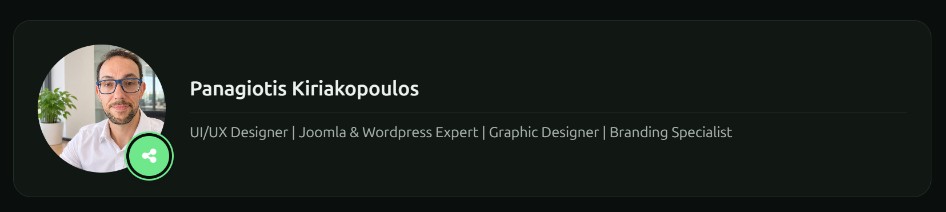
Face Box is a site module that shows a "who's behind this site" card. Use it for an author bio, a team member, the site owner or a contact person in any module position.
Features
- Profile user: pick any registered user and the card shows their name. Blocked users are hidden automatically.
- Profile picture: choose an image from the Media Manager. If you leave it empty, a neutral default avatar is shown.
- Your own text: write a bio or any other content in the editor. Content plugins run on it, so shortcodes and similar features work.
- Social links: Facebook, X (Twitter), LinkedIn, Pinterest and GitHub. Only the networks you fill in appear. Every URL is checked, and only valid http/https links are accepted.
- Two layouts:
- Default: a classic card with the avatar, name, text and a row of social icons.
- Circle: a round avatar with a share button. Clicking it fans the social icons out around the picture. It works with the keyboard (Esc closes it). If JavaScript is off, the links stay visible.
- Accessible: every icon link has a screen-reader label such as "LinkedIn profile (opens in a new window)", and the toggle uses proper aria-expanded and aria-controls attributes.
- Lightweight and modern: loads its CSS and JS through Joomla's Web Asset Manager, and only on pages where the module appears. Images are lazy-loaded, and the script loads only when the Circle layout has links.
- Overrides and caching: supports template overrides, alternative layouts, a module class suffix and Joomla module caching.
- Clean upgrades: updating from 2.x removes old files automatically.
Requirements
| Requirement | Supported |
|---|---|
| Joomla | 6.x |
| PHP | 8.3.0+ |
| Languages | English, Greek |
- Download mod_facebox.zip. Don't unzip it.
- In the Joomla Administrator, go to System → Install → Extensions.
- Drag the zip onto the Upload Package File area, or browse to it. You'll see a success message once it's installed.
- Go to Content → Site Modules → New and choose Face Box.
- Set it up:
- Module tab:
- Profile User: the user whose name is shown.
- Profile Picture: select an image. Leave it empty to use the default avatar.
- Social URLs: enter the full address, such as https://github.com/yourname. Leave a field empty to hide that network.
- Custom text: type a bio or other text in the editor.
- Advanced tab:
- Layout: choose Default or Circle.
- Optionally set a Module Class suffix and caching.
- Module tab:
- Pick a Position, set Status to Published, then assign it to pages under Menu Assignment.
- Click Save & Close and view your site.
Updating: Joomla notices new versions through its update server, so use System → Update → Extensions. You can also install the new zip over the old one; your settings are kept.
Version 2.0.0 ·
- ChangeRebuild from the beginning
More extensions
All extensions-
Plugin Schema Tech Article Plugin